Try it live

Motion design · Claude Opus 5.5 · Remotion · MCP

Motion design with Claude that doesn’t look like everyone else’s.

Aura Lab is a motion design toolkit for Claude and Remotion. A director skill plans every scene before Claude writes code. Live components let you set text, data and colours in the browser. Then Claude brings them into your project as the original code, identical to what you saw.

“Yours won’t” · 8.7 s · 3 scenes · 1080p, 30 fps Made in Claude Code with the Aura Lab director skill, rendered with Remotion.

The problem

Claude can make a motion video. Making it yours is the hard part.

Since Opus 5.5, anyone can get an animated video out of Claude. But three things get in the way of using it for real work: the videos all look alike, getting them right takes hours of steering, and every time you ask for a component again, it comes back a little different.

Same look

Left alone, every model takes the same path.

Centered text on a gradient, everything fading in, a logo at the end. Your launch video looks like everyone else’s.

Aura Lab: a director skill writes the plan first: message, visual metaphor, mood, palette, camera and beats for every scene.

Endless steering

“Make it better” doesn’t work.

You end up giving frame-by-frame notes and re-rendering for hours.

Aura Lab: finishing layers are mandatory, a script blocks the work until they’re there, and a critic reviews the frames before you see them.

Close, not exact

A prompt gets you a remake, not the thing you picked.

Paste a description and Claude rebuilds the component from scratch: spacing, timing and easing drift from what you saw, and it can trip over the scenes you already built.

Aura Lab: Claude receives the original component code with your settings, in its own folder. Same frames as the preview, and nothing else in your project changes.

01 · The director skill

From a one-line brief to a directed video.

The cure for “every AI video looks the same”. A Claude Code skill for Remotion that works like a motion designer: it plans from a short brief, builds with a kit of ready effects, checks its own work and fixes it before you see it. It works with or without our components.

The brief for the video above

“A 5–10 second video about the problem everyone has: AI videos that all look the same.”

The direction plan the skill wrote

Message
Every AI video looks the same; yours won’t.
Metaphor
A wall of identical clips doing the same fade in lockstep. One breaks rank, gains light, depth and camera.
Mood
Precise and luminous: snappy springs for type, elastic for the light, soft for the camera.
Palette
night, ink, violet, pink used sparingly
Camera
Pulls back on the wall, pushes into the one clip, drifts on the signature.
Scenes
1 The wall · 2 Directed · 3 Signature.
Three frames from the video: the wall of identical clips, the line Yours won't, and the Aura Lab signature

Checks and critique, for real. The script checked layers and timing for each scene. On the first frame sheets the critic found the eyebrow flying through the camera, the light overlapping the title and the underline covering the small text. The skill fixed all three before the render.

  1. 1

    Direction before code

    Message, metaphor, mood, palette, camera, then every scene split into anticipation, entrance, response and breath.

  2. 2

    Creativity levels

    Level 1 to 3. Each level makes finishing layers mandatory: depth in the background, secondary motion, accents, a moving camera, type by word or letter.

  3. 3

    A kit of ready effects

    3D parallax camera, faded perspective lines, glows, dust, grain, masked text, lines that draw themselves, plus a recipe book for Three.js, paths, morphing and Lottie.

  4. 4

    Checks and a critic

    A script blocks the work if layers are missing or timings don’t add up. Then a critic agent reads 5 frames per scene, scores them, and the skill fixes them, at most 2 rounds.

02 · Live components

26 Remotion components you set up before Claude builds them.

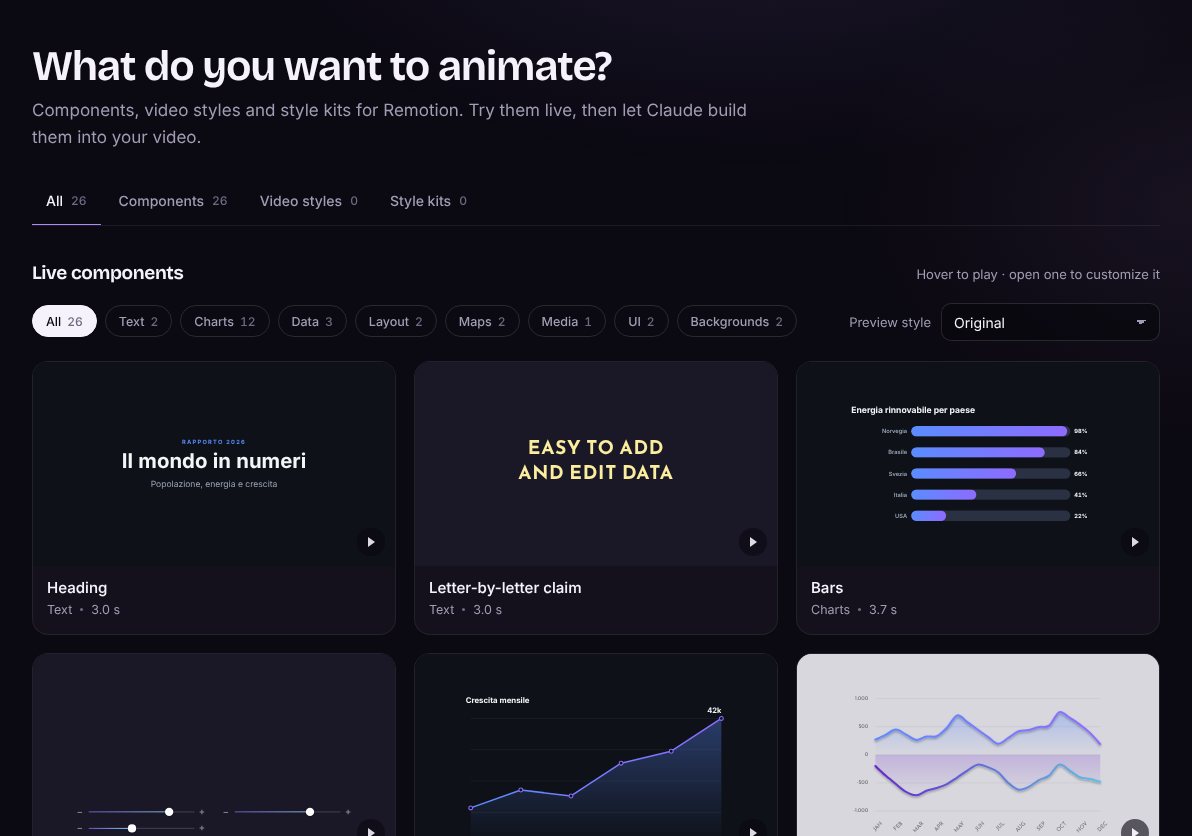
Charts, titles, maps, timelines, cards and backgrounds, each playing live in the gallery. Open one, change texts, data, colours, position and the parts you want to show. What you see is exactly what lands in your video.

yourauralab.cc/gallery
The Aura Lab gallery: live components with category filters and a preview style switcher
yourauralab.cc/components/lib-donut
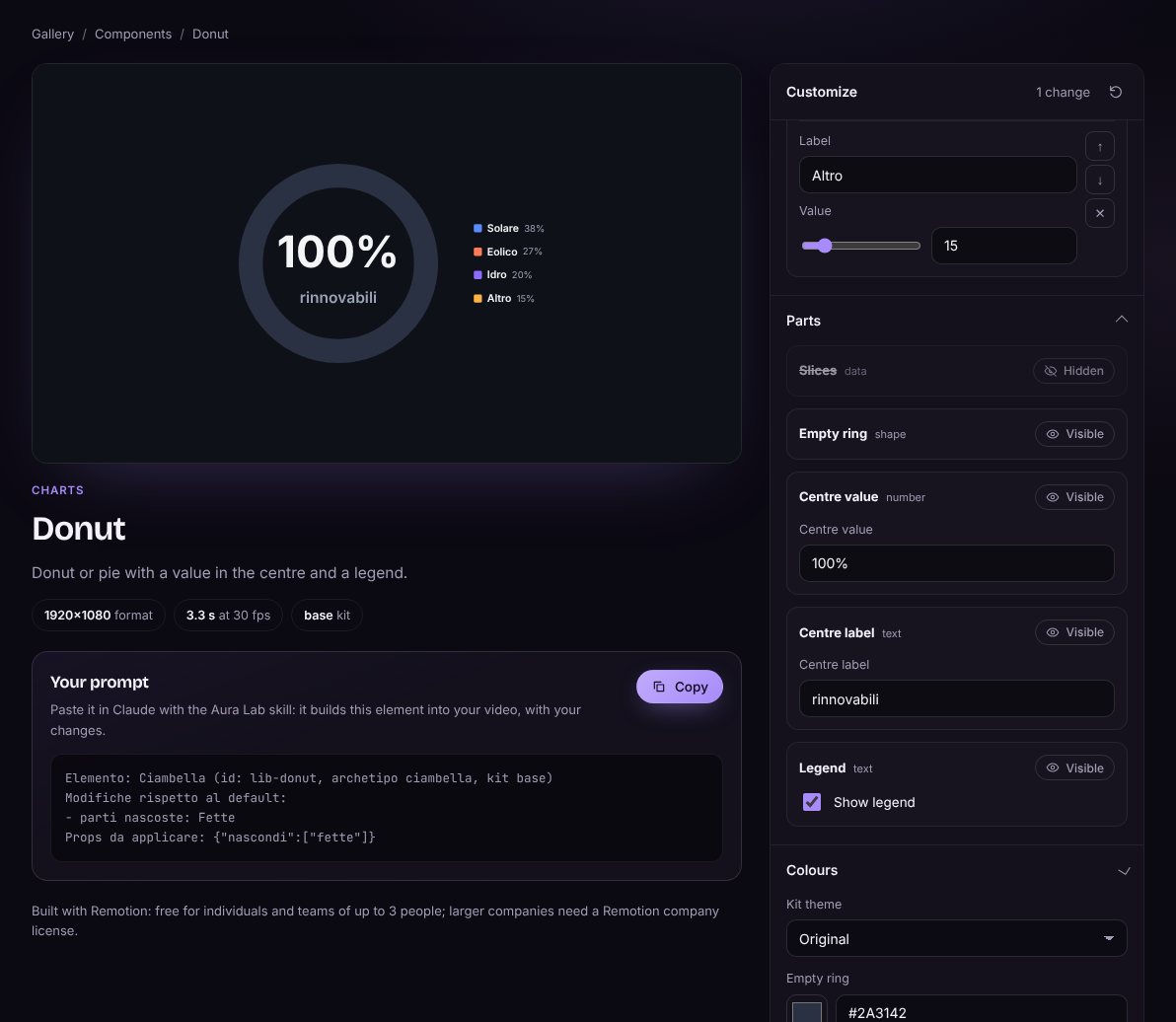
The component editor: the donut slices are hidden and the prompt lists the change

Edit by parts

Every component is split into parts (text, number, data, shape, line). Each part shows only its own options and can be hidden without moving the rest.

Values that make sense

Percentages never pass 100%, donut slices share the ring, every number stays in the component’s range.

Exact code, not a remake

Your settings travel with the component. With Claude connected to Aura Lab, it gets the original code. Without it, the copy-prompt block lists only what you changed.

Try it on this page

Change the bars. Watch the prompt follow.

A simplified version of the editor, running right here. The real one, with the actual Remotion components, is one click away.

Q3 report

Revenue by channel

Items
Accent
Theme
Copy for the prompt

In the library today

  • Heading
  • Letter-by-letter claim
  • Bars
  • Control sliders
  • Line
  • Lines with area
  • Donut
  • Progress
  • Profile with percentages
  • Checklist with bars
  • Concentric rings with photo
  • Butterfly bars
  • Butterfly with scale
  • Radar
  • Stat with icon
  • Country stat card
  • Pictogram rows
  • List
  • Timeline with icons
  • Globe
  • World map
  • Image card
  • Colour swatches
  • Cursor
  • Background
  • Ring background

03 · Connect Claude Early access

Ask Claude for a component. Get the original code.

Connect Claude to Aura Lab with our MCP server and a personal key from your account. When you ask for a component, Claude doesn’t guess or rewrite it: it receives the same Remotion code that runs in the gallery, with your settings, and fits it into your video.

  1. 1

    Customize in the browser

    Pick a component, set text, data, colours and parts. Save it.

  2. 2

    Connect Claude once

    Your account gives you one command with a personal key for the Aura Lab MCP server. Paste it in your terminal.

  3. 3

    Ask for it in your project

    “Add my donut to scene 4.” Claude gets the original files plus your settings, writes them in src/auralab/ and drops the component into the scene.

# one command, copied from your account
claude mcp add --transport http auralab https://yourauralab.cc/api/mcp \
  --header "Authorization: Bearer <your key>"

# then, in Claude Code
> add my donut to scene 4

src/auralab/    the original component files, your scenes untouched

Its own folder

Everything goes in src/auralab/. None of your files is overwritten or renamed.

No global styles

Styles live inside each component, so your other scenes look exactly as before.

Transparent by default

Components have no background of their own: they sit on top of your scene.

Plain Remotion code

Ordinary React and Remotion files, identical to the ones the gallery runs. Claude checks your Remotion version before adding anything.

One registry, more ways in: the MCP server for Claude, and next a command for any editor or AI (npx auralab add donut). Same components, same code.

How it works

You set the direction. Claude does the work.

1

Pick or brief

Customize a component in the gallery, or describe the video in two lines.

use motion-regia: a 15-second intro
for my fitness app, energetic
2

Claude plans, fetches and builds

In your Remotion project, Claude writes the direction plan, brings in the Aura Lab components through MCP and runs the checks and the critic.

regia.md        direction plan
src/auralab/    original components
src/scene/      one file per scene
3

Render the MP4

Remotion renders every frame from code, so the same input gives the same video, every time.

npx remotion render Video out.mp4

Claude never “watches” a video. When it needs to see one, the skill renders frame sheets (still images) and Claude reads those.

Built with Claude

Claude is the engine, not a feature on top.

  • Claude Opus 5.5 in Claude Code writes the direction plan and every frame of the animation as Remotion code.
  • A critic agent, also Claude, reviews the frame sheets with a fixed rubric before anything is delivered.
  • MCP connects Claude to the Aura Lab library, so it works with the original components instead of approximations. Early access
  • The platform itself, gallery, editor, accounts, plans and the MCP server, was built with Claude Code.
  • Next: move the director to the Claude API, so you can brief and render a video from the browser.

Pricing

Start free. One plan for the whole library.

Free

€0

  • Every component live in the gallery
  • Customize and copy the prompt
  • Download every free project
Try the components
Most complete

Pro

€10 / month, VAT included

  • Everything in Free
  • Connect Claude: the whole library as original code, via MCP Early access
  • Download every project, free and Pro
  • New components, video styles and kits as they land
  • Updates to everything you downloaded
Create an account

Payments are handled by Dodo Payments as merchant of record. Checkout is in test mode until the public launch: no card is charged today.

Where we are

What works today, and what comes next.

Working today
  • The director skill, with the video on this page
  • The gallery: 26 live components with the parts editor
  • Accounts, plans and checkout (test mode)
Early access
  • The Aura Lab MCP server and registry: Claude gets the original component code
  • A personal key and a one-line setup command in your account
Next
  • npx auralab add for any editor or AI
  • Public launch of the store and payments
  • Video styles and style kits
Vision
  • Aura Studio: brief, edit and render a video in the browser, with no local setup

FAQ

Questions

Can Claude Opus 5.5 make motion design videos?

Yes. It doesn’t output a video file: it writes code that draws every frame, and a renderer such as Remotion turns those frames into an MP4. The skill makes that code look directed instead of generic.

What is the Aura Lab MCP server?

A connection between Claude and the Aura Lab library. Once it’s added to Claude Code with your personal key, Claude can search the 26 components, fetch the original code with your settings, and add components or a whole video to your Remotion project. Searching is free, installing needs Pro. It’s in early access.

Will it break the video I already have?

No. Aura Lab components go in their own folder (src/auralab/), carry no global styles and have a transparent background. Claude adds them as a normal Remotion component in the scene you choose; your other scenes and files stay as they are.

Do I need Claude to use the components?

Claude is the easiest way, through MCP. The components are plain Remotion/React code, so a command for any editor is coming next.

Do I need to know Remotion?

No. You need Claude Code, Node.js and a Remotion project; Claude writes and edits the code. Knowing a little React helps if you want to tweak things by hand.

What does the director skill need from me?

A short brief: what the video is about, how long, and the mood. Brand colours, fonts or a script are welcome but optional. The level (1 to 3) defaults to 3.

Does Claude watch my videos?

No. When the skill needs to look at a render, it prepares frame sheets, still images of a few frames per scene, and Claude reads those.

Do I need a Remotion license?

Remotion is free for individuals and teams of up to 3 people. Larger companies need a Remotion company license.

Can I cancel Pro?

Yes, from your account, at any time. Pro stays on until the end of the month you paid for.

Try a component. Connect Claude. See the difference.

Four live components are open to everyone, no account needed.

Try the live components